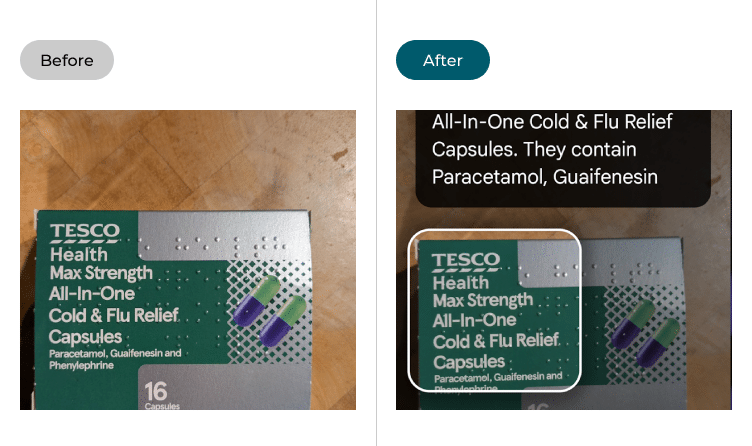
Google launched Guided Vision in Gemini Live on October 1, 2026, a real-time, voice-driven visual assistance feature built for people who are blind, have low vision, or want intuitive visual assistance. The rollout brings voice-forward, real-time visual interpretation to compatible Android devices. No extra hardware is required.
What Guided Vision does
Built alongside the blind and low-vision community, Guided Vision in Gemini Live offers conversational, real-time visual assistance. Users share their camera and receive dynamic audio descriptions and natural verbal reframing cues to explore their environment.
Previous versions of Gemini Live’s camera mode assumed the user could see the screen. If the phone pointed at something the user couldn’t confirm was in frame, there was no way to tell whether the label they wanted read was even visible.
Guided Vision addresses that directly. Users can share their camera during a Gemini Live session and receive dynamic audio descriptions, spoken cues to improve camera framing, and answers to follow-up questions. If the camera is misaligned, Gemini provides verbal prompts to adjust the framing, such as panning right, tilting downward, or stepping back, in order to capture the visual context needed for effective assistance.
The feature can help with everyday tasks such as reading small text, receiving descriptions of surroundings, finding or identifying nearby objects, and learning details about a specific object. It also helps with matching clothing colors or describing an unfamiliar room , and supports conversations across multiple languages.
Like many accessibility innovations, Guided Vision also provides practical visual assistance for older adults, individuals with low literacy, or anyone trying to read fine print in low lighting.
Built with Aira and the accessibility community
Google partnered with Aira to visually interpret data for a total of tens of thousands of hours. More than 1,000 members of Aira’s Trusted Tester network helped stress-test and refine the model across daily routines, while Aira specialists worked directly with Google’s teams as subject-matter experts to help establish and evaluate safety guardrails.
The feature reflects extensive testing and feedback from blind and low-vision communities in India, Brazil, Singapore, Indonesia, and Japan, among others, and Guided Vision handles conversations in several languages.
That breadth of community input sets Guided Vision apart from a simple feature drop, positioning it closer to a co-designed accessibility tool than a standard AI add-on. This kind of software-layer accessibility push sits alongside broader hardware investment in AI infrastructure. Microsoft plans to more than triple Azure data center capacity, signaling just how much compute underpins features like real-time visual AI at consumer scale.
How to access it
Users can reach the feature through the Gemini app, an Android Accessibility shortcut, or Google TalkBack. In the Gemini mobile app, users open profile settings and switch on “Use Guided Vision in Live,” then open Gemini Live and tap to share the camera.
The Android Accessibility shortcut is configured under Android Settings > Accessibility > Vision assistance > Guided Vision. Users can configure an Accessibility shortcut to launch Guided Vision using the floating accessibility button, a two-finger swipe gesture, or by pressing both volume keys.
Guided Vision is now available on Android devices running Android 9 and above in regions and languages where Gemini Live is supported. Google’s Android Accessibility Help page notes the feature is rolling out gradually, so its absence from the menu does not necessarily mean a phone is incompatible.
Limitations Google acknowledges
Guided Vision explicitly is not a medical device, mobility aid, or cane replacement, and Google says not to rely on it for navigation or obstacle detection, guidance that matters since a wrong description could put someone at risk.
The launch places Google in more direct competition with Apple on the accessibility front. Apple’s Live Recognition feature on Apple Vision Pro lets blind or low-vision users get live descriptions of the people, furniture, text, and scenes around them. Live Recognition is also available on iPhone: users point the camera at a room and press the Action button to ask questions about what they are looking at, with VoiceOver answering in the moment. Guided Vision is Google’s comparable answer on Android.
For Android users specifically, the update integrates more tightly with the OS than a standalone app would, accessible directly from Android’s Accessibility settings menu. Developers building on the Gemini platform can also expect the conversational visual layer to influence future app integrations, much as Google’s Fitbit Air paired a screenless tracker with a Gemini health coach, showing the company’s push to embed its AI assistant across multiple device categories and interaction modes.
Google has not announced a separate pricing tier for Guided Vision; the feature ships as part of the existing Gemini app at no additional cost to users on supported Android devices.
